 RSS
RSS
This is how I do web apps on AWS. I like this approach a lot. It's cheap, it scales beautifully, and the architecture provides a solid foundation for expansion.
- There's generally a static website, which uses AWS Cloudfront as a CDN to serve static content from an AWS S3 bucket. This means you can handle huge traffic spikes without causing huge amount of spend.
- And then there's an AWS API Gateway that proxies requests to and from a Lambda function for dynamic requests/responses and other API calls. It's like running a web-app without the overhead of running a server, and only paying on the usage.
This article dives into how I roll out those two platform using OpenTofu/Terraform. My hope is that this will help you not shoot yourself in the foot (eg my feet are riddled with bullet holes. Use my holey feet to save yourself!)
This article could have been called: How to make a zero cost web platform on AWS (using the AWS Free Tier) but I'm not trying to shill for AWS - just simply: here's an awesome (and fairly generic) way to do web stuff at scale, cheaply.
I'm going to set up a domain name of mine that I don't really use, alouy.com. So you'll see it in all the examples. At the end of this article, we'll have https://alouy.com setup as a real website, and https://api.alouy.com setup to for dynamic request/responses.
Here are the components we'll setup, feel free to run tofu/terraform apply after each step to make it easier to debug. And you can just grab the source code itself from github instead of copying and pasting - but again I do recommend applying the code in chunks.
GitHub: Alex's AWS Web Platform
-
Basic configuration
data.tf
# Default region for everything, adjust as required
provider "aws" { region = "ap-southeast-2" }# Note: this region is for the ACM/TLS setup and billing alarms, it must be us-east-1
provider "aws" { alias = "virginia" region = "us-east-1" }# Useful for retrieving account ID dynamically
data "aws_caller_identity" "main" {}variables.tf
variable "name" { default = "alouy" } variable "domain" { default = "alouy.com" } variable "alert_email" { default = "alerts@example.com" } -
S3 bucket
To store the static components of our website, like images, html files,
javascript, css, we create an S3 storage bucket. The Cloudfront caches will
grab items out of the bucket and serve them up to people.
bucket.tf
# Create a new bucket, same name as the domain (if you like)
resource aws_s3_bucket "main" { bucket = var.domain tags = { Name = var.domain } }# Ensure Cloudfront can write logs to the bucket
resource aws_s3_bucket_ownership_controls "main" { bucket = aws_s3_bucket.main.id rule { object_ownership = "BucketOwnerPreferred" } }# Also for Cloudfront logs
resource aws_s3_bucket_acl "main" { bucket = aws_s3_bucket.main.id acl = "log-delivery-write" }# Sane defaults for bucket security
resource aws_s3_bucket_public_access_block "main" { bucket = aws_s3_bucket.main.id block_public_acls = true block_public_policy = true ignore_public_acls = true restrict_public_buckets = true }# Enable encryption at rest (won't really impact your experience of working with the files)
resource aws_s3_bucket_server_side_encryption_configuration "main" { bucket = var.domain rule { apply_server_side_encryption_by_default { sse_algorithm = "AES256" } } } -
ACM SSL Certs
To provide TLS/https certificates (free of charge!).
acm.tf
# Static site
resource "aws_acm_certificate" "main" { provider = aws.virginia domain_name = var.domain subject_alternative_names = ["www.${var.domain}"] validation_method = "DNS" } output "dns_validation_record" { value = aws_acm_certificate.main.domain_validation_options }# Dynamic API
resource "aws_acm_certificate" "api" { provider = aws.virginia domain_name = "api.${var.domain}" validation_method = "DNS" } output "dns_api_validation_record" { value = aws_acm_certificate.api.domain_validation_options }apply output:
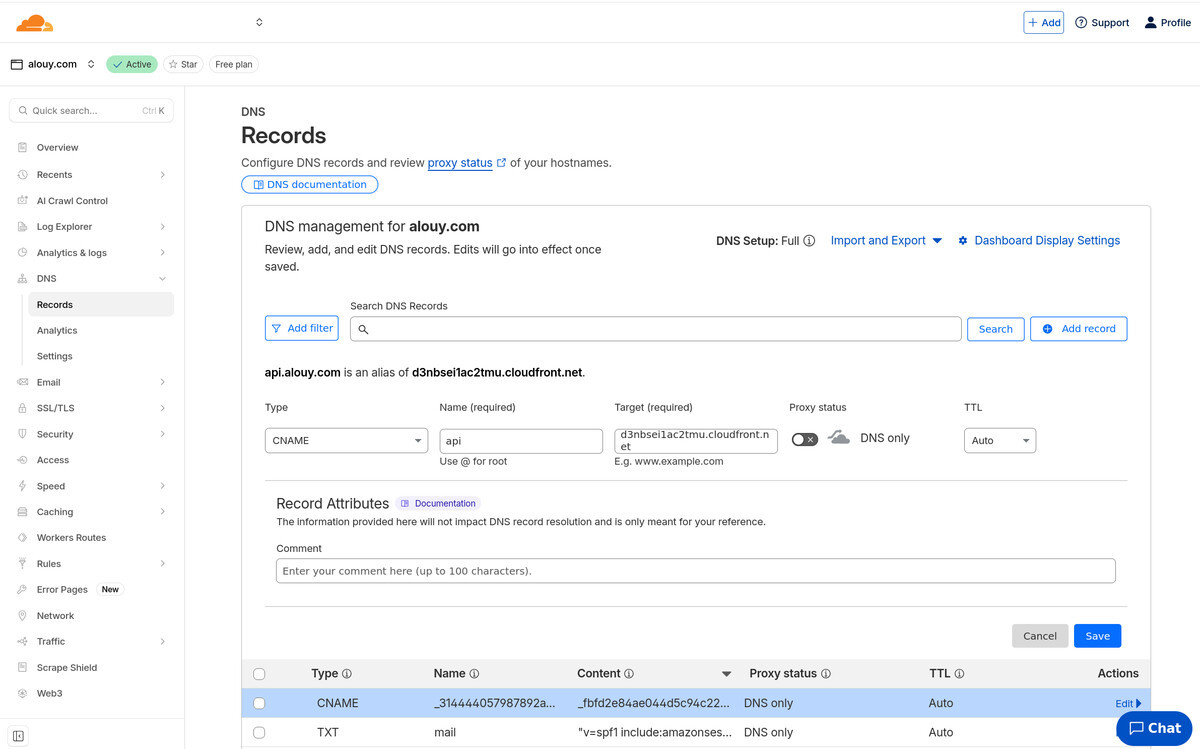
# This output informs you that you will need to manually add new CNAME records:
#
# _314444057987892a15ff8085ce47e3d3.api.alouy.com ->
# _fbfd2e84ae044d5c94c22a711402d0ae.zfyfvmchrl.acm-validations.aws
#
# _4b0e5ae4d5e3c5d52851933a669d602d.alouy.com ->
# _6797f89abcce42e4324250df2c63662b.rvctyfnwhz.acm-validations.aws
#
# _d3a185f01c38a33c4bcaa80ef273bd66.www.alouy.com ->
# _ae1965532444a06b88141c0c0e9f6d3f.rvctyfnwhz.acm-validations.aws
dns_api_validation_record = toset([ { "domain_name" = "api.alouy.com" "resource_record_name" = "_314444057987892a15ff8085ce47e3d3.api.alouy.com." "resource_record_type" = "CNAME" "resource_record_value" = "_fbfd2e84ae044d5c94c22a711402d0ae.zfyfvmchrl.acm-validations.aws." }, ]) dns_validation_record = toset([ { "domain_name" = "alouy.com" "resource_record_name" = "_4b0e5ae4d5e3c5d52851933a669d602d.alouy.com." "resource_record_type" = "CNAME" "resource_record_value" = "_6797f89abcce42e4324250df2c63662b.rvctyfnwhz.acm-validations.aws." }, { "domain_name" = "www.alouy.com" "resource_record_name" = "_d3a185f01c38a33c4bcaa80ef273bd66.www.alouy.com." "resource_record_type" = "CNAME" "resource_record_value" = "_ae1965532444a06b88141c0c0e9f6d3f.rvctyfnwhz.acm-validations.aws." }, ])aws acm --region us-east-1 list-certificates \ --query "CertificateSummaryList[?contains(DomainName, 'alouy.com')].[CertificateArn, DomainName, Status]" \ --output table -
Cloudfront
To serve out cached versions of the static website from the S3 bucket.
Note: adding Cloudfront means that we don't incur S3 data transfer charges -
those are masked by the Cloudfront cache, which performs a once-off fetching of
the files from the bucket. This will take about 5 minutes to create.
cloudfront.tf
# Policy to allow Cloudfront to fetch files from S3 bucket
resource "aws_s3_bucket_policy" "main" { bucket = aws_s3_bucket.main.id policy = jsonencode({ Version = "2012-10-17" Statement = [ { Effect = "Allow" Principal = { Service = "cloudfront.amazonaws.com" } Action = ["s3:Get*"] Resource = "${aws_s3_bucket.main.arn}/*" Condition = { StringEquals = { "aws:SourceArn" = aws_cloudfront_distribution.main.arn } } } ] }) }# Ensure Cloudfront always uses SigV4 requests when accessing S3 files
resource "aws_cloudfront_origin_access_control" "main" { name = "Cloudfront OAC" origin_access_control_origin_type = "s3" signing_behavior = "always" signing_protocol = "sigv4" }# Create the Cloudfront CDN distribution!
resource "aws_cloudfront_distribution" "main" { enabled = true is_ipv6_enabled = true comment = "${var.domain} website" default_root_object = "index.html" retain_on_delete = false aliases = [ var.domain, "www.${var.domain}" ] origin { domain_name = aws_s3_bucket.main.bucket_regional_domain_name origin_id = "origin-${var.name}" origin_access_control_id = aws_cloudfront_origin_access_control.main.id origin_path = "/website" } default_cache_behavior { allowed_methods = ["HEAD", "DELETE", "POST", "GET", "OPTIONS", "PUT", "PATCH"] cached_methods = ["GET", "HEAD"] target_origin_id = "origin-${var.name}" forwarded_values { query_string = true cookies { forward = "all" } query_string_cache_keys = ["version"] } viewer_protocol_policy = "redirect-to-https" min_ttl = 0 default_ttl = 86400 max_ttl = 31536000 compress = true } restrictions { geo_restriction { restriction_type = "none" } } tags = { Name = var.name } viewer_certificate { acm_certificate_arn = aws_acm_certificate.main.arn ssl_support_method = "sni-only" minimum_protocol_version = "TLSv1" } logging_config { bucket = "${var.domain}.s3.amazonaws.com" include_cookies = false prefix = "logs" # this folder in the s3 bucket for logs } } output "url_static" { value = aws_cloudfront_distribution.main.domain_name } -
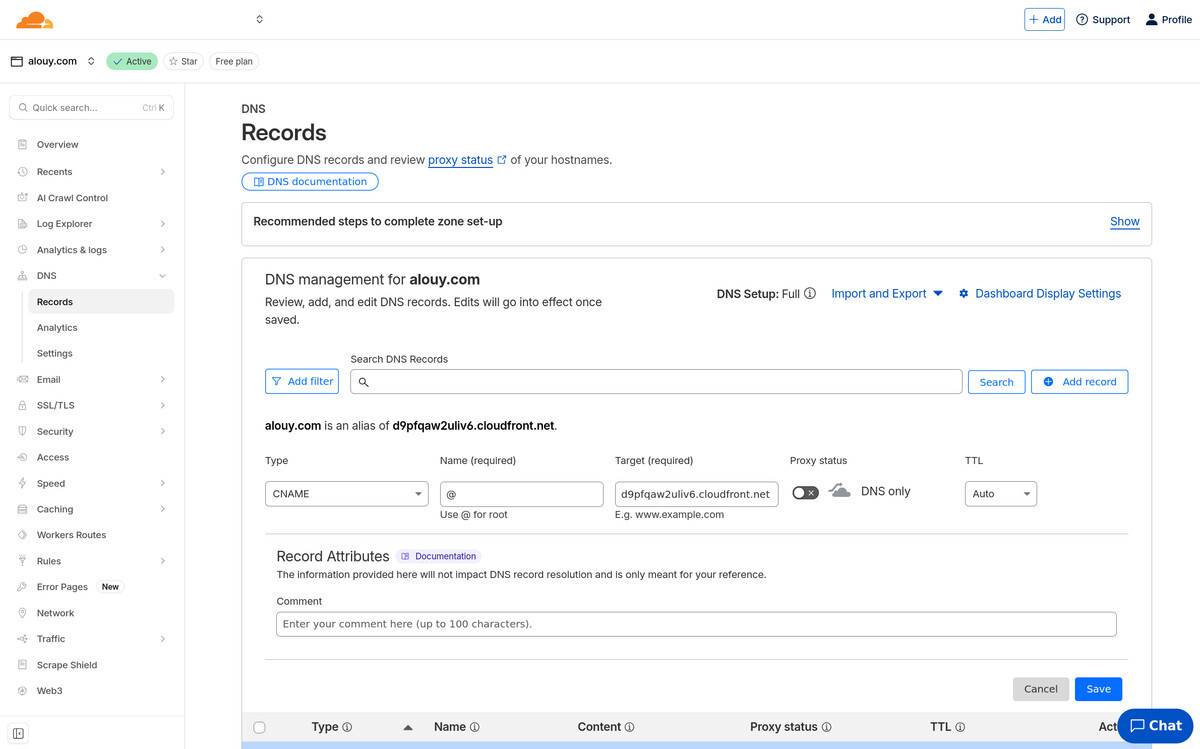
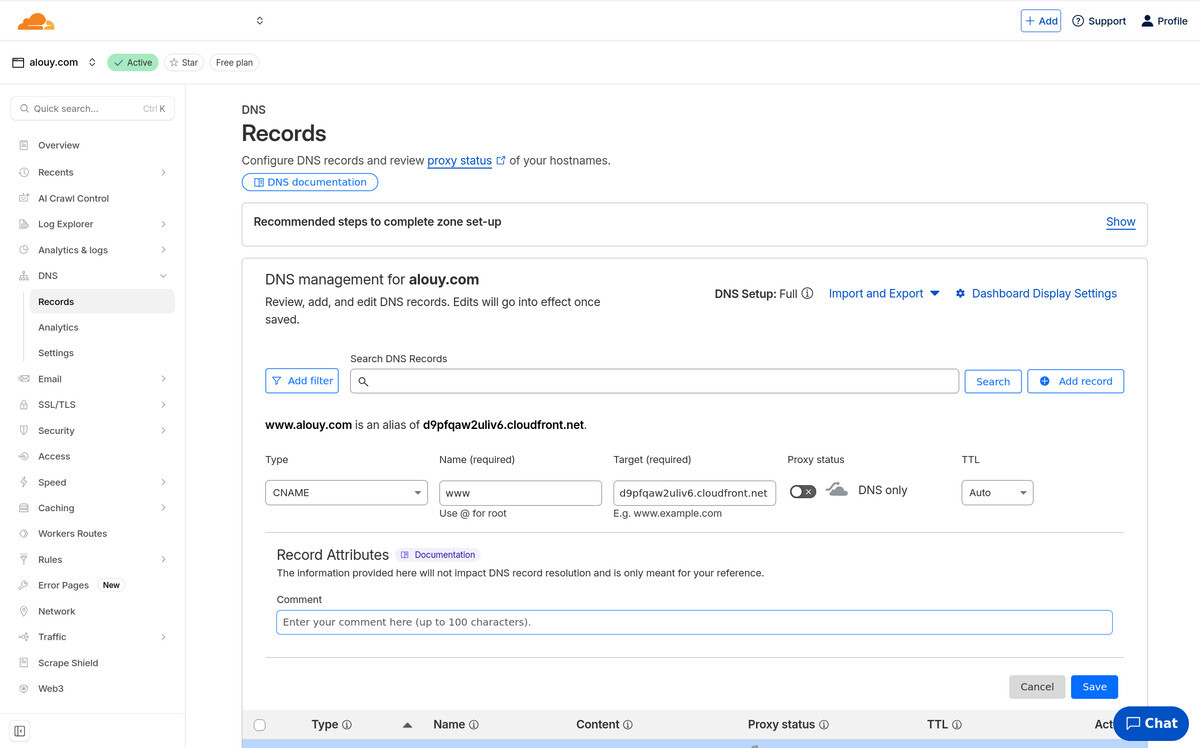
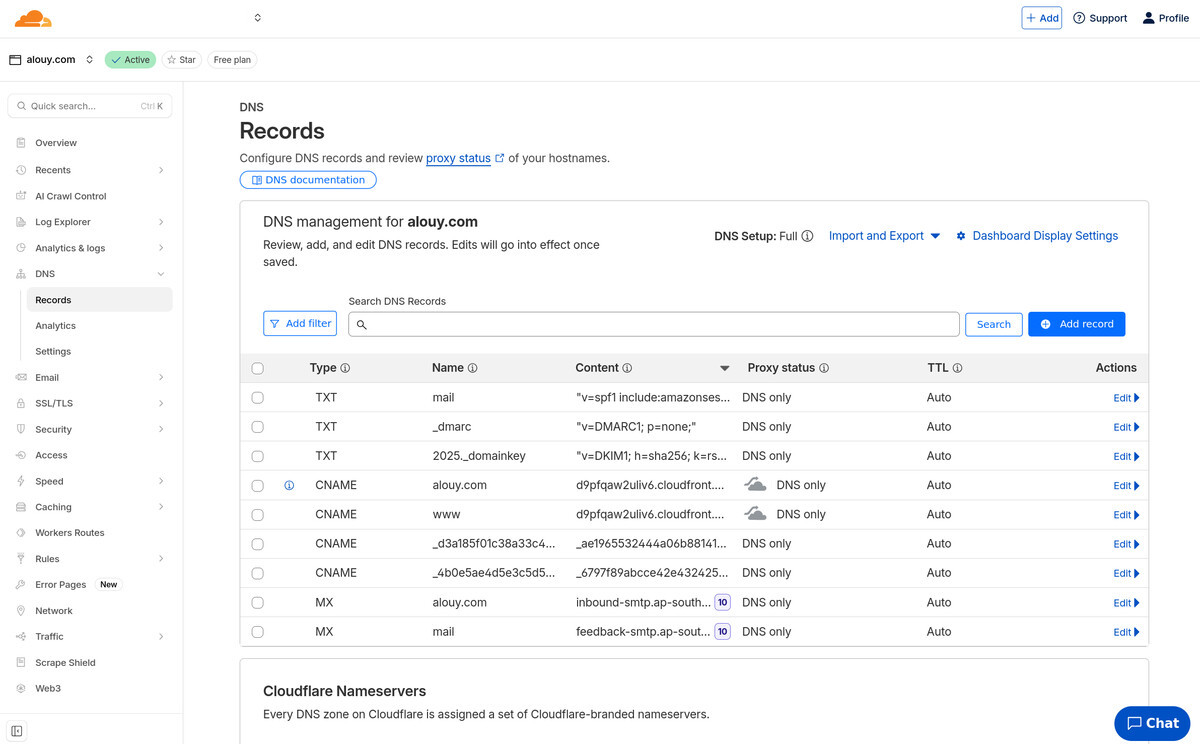
DNS
To allow web requests to reach your Cloudfront distribution we've got to
add CNAME DNS records, one for a "flattened" A record and one for a www record.
(but both are actually CNAME).
-
Upload a file and test the static website.
# Create a test index.html file
echo "Hello world!" > index.html# Copy index.html into bucket.
# Note, we configured Cloudfront to serve files from the "website" sub-dir
aws s3 cp index.html s3://alouy.com/website/# Check if website works (yes you can just visit it in your web browser now too)
curl -L alouy.comDISTID=ABCDEFG1234 aws cloudfront create-invalidation \ --distribution-id $DISTID \ --invalidation-batch \ '{"Paths":{"Quantity":1,"Items":["/*"]},"CallerReference":"'$(date +%s)'"}'Ok! That's the static website side of the show. Now onto the dynamic side...
-
Lambda function
We'll setup some demo code for the lambda function in a folder named
"lambda" that will get packaged in a zip archive for deployment.
lambda/main.py
# Demo code
import json def lambda_handler(event, context): print(f"received event: {event}")# note special format of response for API Gateway
return { "statusCode": 200, "headers": {"Content-Type": "application/json"}, "body": json.dumps({"message": "OK"}) }lambda.tf
# This data source, will automatically create a zip archive suitable for lambda deployment
data "archive_file" "main" { type = "zip" output_path = "./lambda.zip" source_dir = "./lambda" }# Optional, but aliases are handy for repeated deploys, as the API Gateway won't
# need to be updated every time the lambda function is updated
resource "aws_lambda_alias" "main" { name = "prod" description = "Alias for lambda" function_name = aws_lambda_function.main.arn function_version = aws_lambda_function.main.version }# This is the place where you'll eventually update the amount of memory and so
# on for your lambda function. Note: that even though lambda functions can run for
# up to 15 minutes, the API Gateway will time it out after 29 seconds.
resource "aws_lambda_function" "main" { filename = data.archive_file.main.output_path function_name = var.name role = aws_iam_role.lambda.arn handler = "main.lambda_handler" runtime = "python3.13" timeout = 28 source_code_hash = data.archive_file.main.output_base64sha256 } resource "aws_iam_role" "lambda" { name = "lambda-${var.name}" assume_role_policy = jsonencode({ Version = "2012-10-17" Statement = [ { Effect = "Allow" Principal = { Service = "lambda.amazonaws.com" } Action = ["sts:AssumeRole"] } ] }) }# Create a log group in cloudwatch to monitor and debug the lambda
resource "aws_cloudwatch_log_group" "lambda" { name = "/aws/lambda/${aws_lambda_function.main.function_name}" retention_in_days = 60 tags = { Name = aws_lambda_function.main.function_name type = aws_lambda_function.main.function_name } } resource "aws_iam_role_policy" "lambda" { role = aws_iam_role.lambda.id policy = jsonencode({ Version = "2012-10-17" Statement = [ { Effect = "Allow" Action = [ "logs:CreateLogStream", "logs:PutLogEvents" ] Resource = "arn:aws:logs:${data.aws_region.main.name}:${data.aws_caller_identity.main.account_id}:log-group:/aws/lambda/${aws_lambda_function.main.function_name}:*" }] }) } -
API Gateway
To proxy dynamic requests/response through to your Lambda function. This bit always seems to need repeated attempts.
        api.tf
        resource "aws_api_gateway_rest_api" "main" {
          name               = var.name
          description        = ""
          minimum_compression_size = 0  # enable gzip compression
          endpoint_configuration {
            types = ["REGIONAL"]
          }
        }

        resource "aws_api_gateway_deployment" "main" {
          rest_api_id = aws_api_gateway_rest_api.main.id
          depends_on = [
            aws_api_gateway_method.main
          ]
        }

        resource "aws_api_gateway_stage" "main" {
          cache_cluster_enabled = false
          cache_cluster_size    = null
          deployment_id = aws_api_gateway_deployment.main.id
          rest_api_id   = aws_api_gateway_rest_api.main.id
          stage_name    = "prod"
        }

        resource "aws_api_gateway_base_path_mapping" "main" {
          api_id      = aws_api_gateway_rest_api.main.id
          domain_name = aws_api_gateway_domain_name.main.domain_name
          stage_name  = aws_api_gateway_stage.main.stage_name
        }

        resource "aws_api_gateway_domain_name" "main" {
          domain_name     = "api.${var.domain}"
          certificate_arn =  aws_acm_certificate.api.arn
          security_policy  = "TLS_1_2"
        }

        output "url_api" {
          value = aws_api_gateway_domain_name.main.cloudfront_domain_name
        }

        // Lambda integration
        resource "aws_api_gateway_resource" "main" {
          path_part   = "{proxy+}"
          parent_id   = aws_api_gateway_rest_api.main.root_resource_id
          rest_api_id = aws_api_gateway_rest_api.main.id
        }

        resource "aws_api_gateway_method" "main" {
          rest_api_id   = aws_api_gateway_rest_api.main.id
          resource_id   = aws_api_gateway_resource.main.id
          http_method   = "ANY"
          authorization = "NONE"
        }

        resource "aws_api_gateway_integration" "main" {
          rest_api_id             = aws_api_gateway_rest_api.main.id
          resource_id             = aws_api_gateway_resource.main.id
          http_method             = aws_api_gateway_method.main.http_method
          integration_http_method = "POST"
          type                    = "AWS_PROXY"
          uri                     = aws_lambda_alias.main.invoke_arn
        }

        resource "aws_lambda_permission" "main" {
          action        = "lambda:InvokeFunction"
          function_name = aws_lambda_function.main.function_name
          qualifier     = aws_lambda_alias.main.name
          principal     = "apigateway.amazonaws.com"
          source_arn    = "${aws_api_gateway_rest_api.main.execution_arn}/*"
        }
-
Cloudwatch error monitoring
To alert you when your Lambda function is having errors, or when your billing/costs are unexpectedly large.
monitoring.tf
# One SNS to send emails - default region - same as lambda function
resource "aws_sns_topic" "main" { name = "${var.name}-alerts" } resource "aws_sns_topic_subscription" "main" { topic_arn = aws_sns_topic.main.arn protocol = "email" endpoint = var.alert_email } resource "aws_cloudwatch_metric_alarm" "main" { alarm_name = "${var.name} error" comparison_operator = "GreaterThanThreshold" evaluation_periods = "1" metric_name = "Errors" namespace = "AWS/Lambda" datapoints_to_alarm = 1 period = 180 threshold = 0 statistic = "Sum" alarm_description = "The ${var.name} lambda just experienced an error. Check the lambda logs in cloudwatch." alarm_actions = [aws_sns_topic.main.arn] treat_missing_data = "notBreaching" dimensions = { FunctionName = var.name } }# Billing alerts need to be in us-east-1 unfortunately, so create another SNS for them
resource "aws_sns_topic" "billing" { # Must create this in us-east-1 for billing alerts provider = aws.virginia name = "billing-alerts" } resource "aws_sns_topic_subscription" "billing" { # Must create this in us-east-1 for billing alerts provider = aws.virginia topic_arn = aws_sns_topic.billing.arn protocol = "email" endpoint = var.alert_email }# Alert on daily billing exceeding some threshold
resource "aws_cloudwatch_metric_alarm" "daily_billing" { # Must create this in us-east-1 provider = aws.virginia region = "us-east-1" alarm_name = "Daily spend over $20" comparison_operator = "GreaterThanThreshold" evaluation_periods = 1 metric_name = "EstimatedCharges" namespace = "AWS/Billing" statistic = "Maximum" period = 86400 # 1 day in seconds threshold = 20 alarm_description = "Daily AWS spend exceeded $20." alarm_actions = [aws_sns_topic.billing.arn] dimensions = { Currency = "USD" } treat_missing_data = "notBreaching" }# Alert on monthly sum exceeding some threshold
resource "aws_cloudwatch_metric_alarm" "monthly_billing" { # Must create this in us-east-1 provider = aws.virginia region = "us-east-1" alarm_name = "Monthly spend over $50" comparison_operator = "GreaterThanThreshold" evaluation_periods = 1 metric_name = "EstimatedCharges" namespace = "AWS/Billing" statistic = "Maximum" period = 86400 # billing metrics only update daily, so period = 1 day is fine threshold = 50 alarm_description = "Monthly AWS spend exceeded $50." alarm_actions = [aws_sns_topic.billing.arn] dimensions = { Currency = "USD" } treat_missing_data = "notBreaching" } -
Test the API
A lot can go wrong here. There are a few ways to debug. I start from the
AWS web console, go to the API Gateway section and run a Test on your endpoint.
Review the debug code that it generates. That should give you a huge clue.
Another thing is you often need to do an API Gateway re-deploy after making changes. It's a huge gotcha.# Note that you need an endpoint on the end of the URL
curl https://api.alouy.com/test {"message": "OK"}
Once you're done you'll have a static website that can scale inexpensively to millions of requests per day and an API that can respond to dynamic requests in whatever fashion you like, as well as all the monitoring setup to ensure you don't get surprised by an AWS bill.
Now you can add Flask (or whatever you prefer) to your Lambda function to handle all sorts of routes and requests, and you'll need to setup CORS if your main website has to make requests to the API.
Good luck my friend! And don't hesitate to reach out if I can support you through my consulting business.